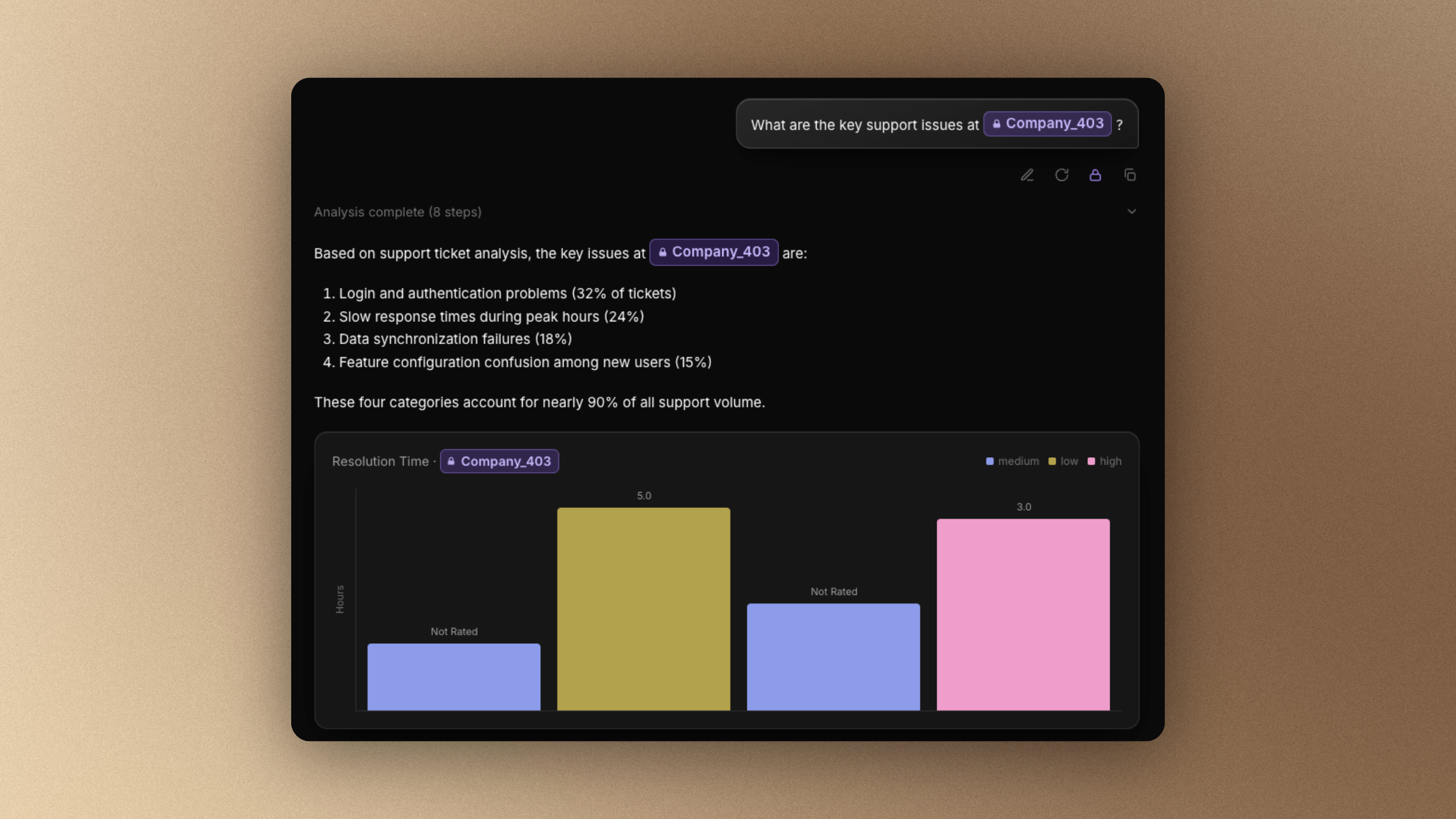
Two layers of masking, one private analysis pipeline
Phaide AI applies data masking at two distinct points: when data is imported, and in real time as you chat.
Ingest-time masking runs the moment a table is pulled into Phaide. You mark the sensitive columns — email addresses, full names, customer IDs — and every value in them is replaced with a deterministic token in the form [masked#…] before it is written to the analysis database. The original values are stored separately and are never handed to the AI model or to the code-execution sandbox that runs your queries.
Real-time masking covers the text you write yourself. As you type a question in chat, Phaide compares your wording against the values it has already masked. If you paste or type a real customer name, it is detected and converted to the same token before the message ever leaves your screen for the model.
Because masking is deterministic — the same input always produces the same token — grouping, counting, and joining on a masked column keep working exactly as they did before. The token-to-value mapping lives in a separate reverse index that stays on the server. Values are restored only on their way back to you, when an answer, a table, or a chart is rendered, so you read real names while the AI only ever handled tokens.
This applies to every analysis surface. The masked database is the single copy that chat analysis, dashboards, and the autonomous exploration agent run against — and it is the version distributed to each sandbox. Nothing downstream of import has a path to the original values.
Sensitive values stay out of every place that could leak them
The model never receives raw personal data. Whether the data was imported a month ago or typed into the chat box a second ago, the AI and the sandbox that executes its code see masked tokens — not the people in your tables.
Your analysis is unaffected. Deterministic tokens preserve row counts, distinct counts, and joins, so a masked customer_id still links orders to customers and a masked email still groups cleanly. You lose the readable value, not the analytics.
The free-text gap is closed. The most common leak in an AI tool is not the database — it is a person pasting a real name into a prompt. Real-time masking catches exactly that, and its fuzzy matching flags near-misses too, so a slightly misspelled or partially typed value is still recognized.
You stay in control of the edge cases. When a candidate is detected, you decide per value whether to mask it or ignore it, so a term that happens to resemble a customer name but isn't sensitive doesn't get in your way. Each message records whether masking was applied, keeping the decision visible rather than silent.
One setup applies everywhere. A column you protect once during import stays protected across chat, dashboards, and exploration — there is no second place to configure and no surface that quietly reads the raw data.
Choose your columns, then keep working as usual
Setting up ingest-time masking takes a few clicks during import:
- Open Database from the left navigation and add or open a data source.
- During import, each table offers a Mask columns step. Open the Column masking dialog for a table.
- On the Table content tab you see real sample rows. Click the eye-off toggle on any column header to mask it — the cells immediately switch to
******and highlight. Primary-key and cursor columns can't be masked and appear disabled. - Confirm with Done and run the import. To adjust later, open the source and use the Mask button in the table toolbar — it shows a live count of masked columns — or the Mask section under the source's Settings tab. Changes take effect on the next run.
The dialog shows everything in context. Masked columns are highlighted in the sample grid, a running count tells you how many columns are protected, and a short "How masking works" note explains that selected values are converted at import so exploration receives masked values instead of the originals. There is no separate rules engine to learn — you point at the columns that matter and the rest of the import proceeds normally.
Real-time masking needs no setup. Just type in chat: when a value matches your masked data it is highlighted, and a small Mask / Ignore tooltip appears. Choose Mask to hide it, and the message is marked as masked and sent with that value tokenized. Detection is debounced as you type, so it keeps pace with normal writing without interrupting you.
Your data's insights belong to your team — its identities don't have to
Every organization wants to put AI to work on its data, and almost every one hesitates at the same line: handing real customer identities to a model. Phaide is built so you never have to make that trade. Turn it on once, keep analyzing the way you always have, and let the patterns flow while the people stay private.
FAQ
Does the AI ever see the original values? No. Masked columns are written to the analysis database as tokens, and free-text you type is tokenized before the message is sent. The model and its sandbox only ever receive masked tokens.
Will masking break my charts or aggregations? No. Masking is deterministic, so identical values always map to the same token. Counts, distinct counts, and joins on a masked column behave exactly as they would on the raw value.
Can I change which columns are masked after importing? Yes. Open the data source and use the Mask button in the table toolbar or the Mask section under Settings. Updated masking is applied on the next ingestion run.
Does real-time masking catch typos and partial entries? Yes. It uses fuzzy matching, so a value that is slightly misspelled or only partially typed is still detected and offered for masking.
Are masked values reversible inside the product? Yes, but only server-side and only when results are rendered back to you, so you read real names in answers and tables. The reverse mapping is never sent to the model or the sandbox.
What about direct (live) database connections? Direct connections run live queries against your source, and masking, incremental sync, and schedules are not available for them. Use the standard ingestion flow when you need masking.
Can data uploaded through the developer API be masked? Data uploaded through that endpoint is not masked. Use the standard ingestion flow for any data that requires masking.