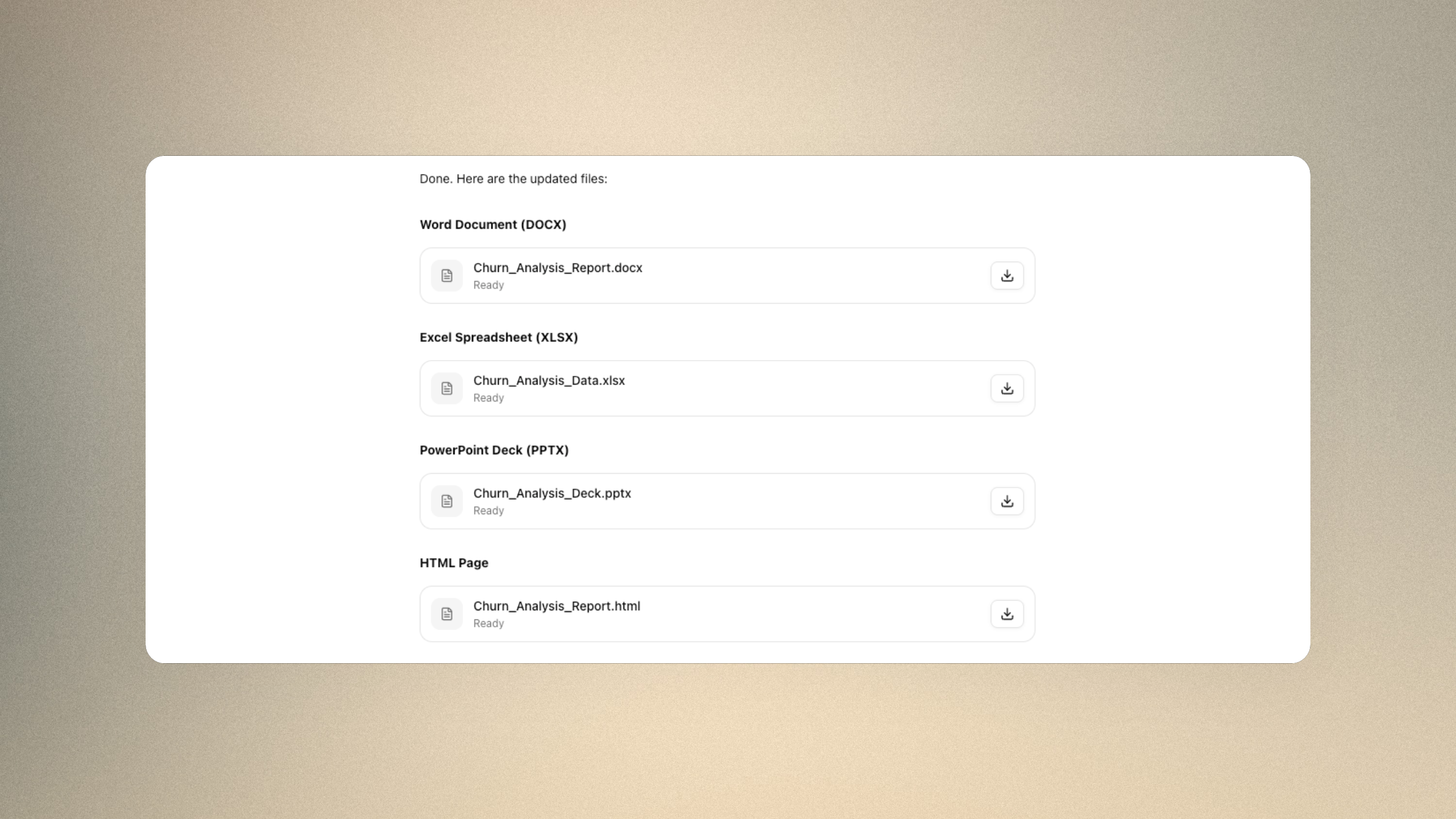
From Conversation to Finished Deliverable
Phaide AI now generates fully formatted Microsoft Office documents directly inside the chat analysis workspace. Three formats are supported: PowerPoint (.pptx), Excel (.xlsx), and Word (.docx). These are genuine, editable Office files — not screenshots, not plain text — assembled from the numbers, tables, and findings already present in your conversation.
You request the document in everyday language and name the format. The assistant reads the analysis you have just completed, builds the file, and returns it as a downloadable card in the chat. The work that normally lives in a separate slide editor or spreadsheet now happens in the same place you ran the analysis.
Behind the request, the document is constructed programmatically rather than approximated — slides, cells, formulas, headings, and styling are written into a real Office file. That is why what you download behaves exactly like a file you authored yourself: every element is a true object you can click into, reformat, and extend.
Each format is suited to a different end. PowerPoint turns your findings into a presentation you can walk an audience through. Excel preserves the structure of your data as live cells and formulas, ready for further modeling. Word captures a narrative — the context, the analysis, and the conclusion — as a document you can circulate or attach. You choose the one that matches how the work will be received.
Reporting Work That Used to Take an Afternoon
The value is in what you no longer rebuild by hand.
- Your analysis flows straight into the file. Query results, summaries, and the insights from your chat are carried into the document automatically — no copy-paste, no retyping figures.
- The output is presentation-ready. Slide decks are built against deliberate design conventions: a content-informed color palette, varied layouts, and visual hierarchy rather than plain bullets on white. Spreadsheets follow professional financial-model formatting — consistent fonts, standard number formats, and a strict requirement of zero formula errors.
- The result is yours to edit. Because every output is a native
.pptx,.xlsx, or.docx, you can open it in PowerPoint, Excel, or Word and refine it like any other file. Nothing is locked to the platform. - Sensitive data stays protected. Values that were masked during analysis are restored only inside your finished file, which is then encrypted and stored under your organization's isolated space before you download it.
- The format fits the job. A monthly review becomes a structured deck, a set of figures becomes a clean workbook, and a written conclusion becomes a formatted report — each shaped for how it will actually be used and shared.
The net effect: the gap between "I have the answer" and "I have something to send" closes from hours to a single sentence. Analysts spend their time on the thinking, not on the formatting; the assistant handles the assembly, the styling, and the consistency checks that usually eat the final hour before a deadline.
Three Steps Inside the Chat
The whole flow happens on the Chats screen, and it follows the rhythm of a normal conversation — analyze, ask, receive.
- Run your analysis. Ask questions and explore your data in chat as you normally would, until you have the results you want to share.
- Request the document — and name the format. Type a plain request such as "Turn this into a PowerPoint," "Export these results to Excel," or "Write this up as a Word report." Stating the format is what tells the assistant which kind of file to produce. For larger pieces, it may first show a quick outline of the proposed content so you can confirm the direction before the full file is built.
- Download. A file card appears in the conversation, showing Preparing file… while the document is generated and secured, then switching to Ready. Press the Download button to save it, or open the card to inspect the file before downloading. If you want a change, just say so in the same chat — "make the title slide darker," "add a totals row," "shorten the summary" — and a revised file comes back.
There is no separate export menu to hunt for and no template to configure in advance. The same conversation that produced the insight produces the deliverable, and the same conversation can refine it. Because the request is just language, the same flow works whether you need a single-sheet export or a multi-slide presentation for a leadership review.
Your Next Report Is One Sentence Away
The distance between a good analysis and a document your stakeholders actually read has always been tedious, manual work. Now that distance is a single request, and what comes back is polished enough to send and editable enough to make your own. Try it on your next analysis — you may never rebuild a slide from scratch again.
FAQ
Which file formats can Phaide AI create?
Three: PowerPoint (.pptx), Excel (.xlsx), and Word (.docx). Each is a standard, editable Microsoft Office file.
Where do I find this feature? It lives in the Chats analysis screen. There is no separate tool or button to enable — you simply ask for a document in the conversation where you ran your analysis.
How does the assistant know what to put in the document? It uses the context of your current chat — the questions you asked, the query results, and the insights surfaced during the analysis. The more you have explored before requesting the file, the richer the document.
Do I have to specify the format? Yes. Naming the format — PowerPoint, Excel, or Word — is how the assistant knows which kind of file to build. A request like "make me a slide deck of this" works; an unspecified "document this" is best stated with the format you want.
Can I edit the file after it is generated? Absolutely. The outputs are native Office files, so you can open them in PowerPoint, Excel, or Word and change anything you like.
Is my data safe in the generated files? Yes. Data that was masked during analysis is restored only inside your own file, which is encrypted and stored in your organization's isolated storage. Files are scoped per organization and downloaded over a secure channel.
How long does generation take? The file card shows a Preparing file… state while the document is built and secured in the background, then updates to Ready when the download is available. Larger or more design-heavy documents take longer, as the assistant builds and checks the output before delivering it.