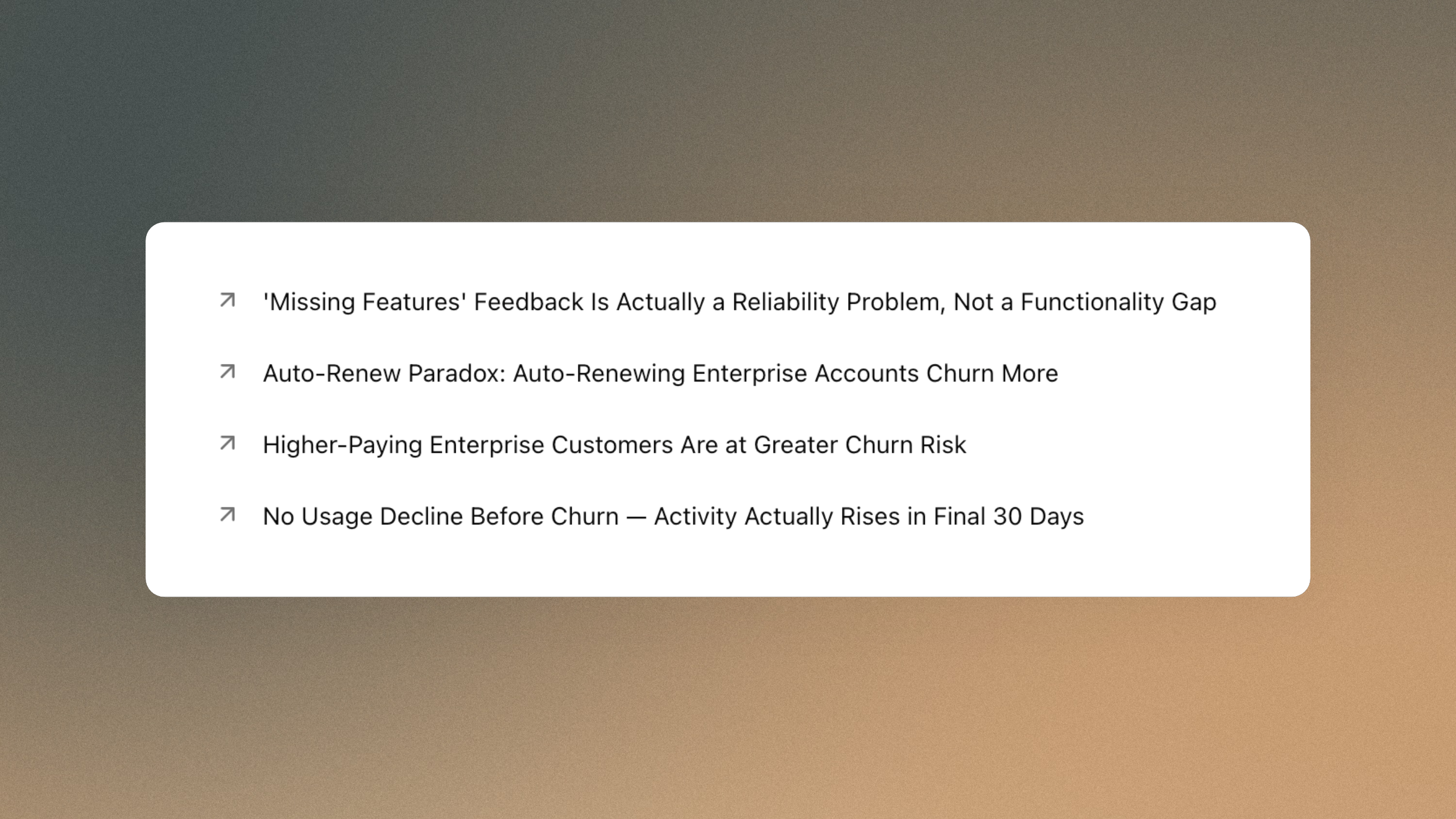
The home screen that hands you findings
Open Phaide and the first thing you see is the "Start your analysis" screen. Just beneath the chat box sits a short list of one-line findings. Each one is a genuinely surprising fact pulled from your own data — a correlation nobody expected, an outlier worth a second look, a pattern that runs against the grain of how the business is assumed to work. Click any line and a panel opens with the full explanation and, where a picture helps, an interactive chart.
You don't choose what appears. The list is drawn at random from a growing pool of discoveries your organization has accumulated, so it reads less like a fixed menu and more like a feed that has something different to show every time you arrive. A finding can be skimmed in a second from its headline, opened for the reasoning behind it, or carried into a full analysis — all without leaving the screen you already start your day on.
These are not generic tips. Every entry is produced by the final stage of Phaide's automatic exploration pipeline. An exploration first plans several angles of attack, runs them in parallel across your data, and writes up a report. Only then does a dedicated discovery agent re-read all of the findings it gathered, search specifically for results that contradict what you'd expect, and — when a number looks too strange to take at face value — re-run the original analysis code to confirm it before publishing. Each surviving finding is written to read at a glance, with a headline that earns the click and a fuller explanation underneath. Only checked findings reach the list. That is the whole idea behind Surprising Discovery: the questions you didn't know to ask, answered before you ask them.
Why a fact you didn't search for is worth more
Dashboards and chat answer the questions already on your mind. Surprising Discovery raises the ones that weren't — the blind spots that rarely surface because no one thinks to query them. A monthly report tells you what you measured; this tells you what you missed.
- It finds the unknown unknowns. The agent is told to look for the counterintuitive, not the obvious, so it surfaces what a standard report would walk straight past.
- It costs you nothing. Discoveries are generated in the background after each exploration. They never block your report and never slow your screen.
- It is grounded, not guessed. Each finding traces back to real analysis code. Suspicious values are re-verified rather than paraphrased, and a discovery is dropped before a doubtful one is invented.
- It compounds across the team. Findings accumulate in an organization-wide pool, so a discovery uncovered by one analyst can spark the next person's investigation.
- It stays current. Discoveries are tied to your data's current schema. When your data structure changes, stale findings quietly drop out of rotation.
- It keeps secrets. Sensitive values stay masked throughout generation and are restored only for your own organization.
- It shows, not just tells. When a chart makes the point sharper, the agent builds an interactive Plotly figure and attaches it, so the surprise lands the moment the panel opens.
From one exploration to a steady stream
Surprising Discovery is the by-product of exploration, so the way to feed it is simply to explore.
- Run an exploration. Three paths lead there: open the Explore page and start an analysis, switch on Discover mode in chat — the toggle that lets AI agents examine your data from multiple angles and surface findings you might not have thought to ask about — or set explorations to run on a recurring schedule.
- Let Phaide finish the job. When the exploration delivers its report, the discovery agent keeps working in the background. There is nothing extra to click.
- Return to the home screen. On "Start your analysis," up to four discoveries appear beneath the chat box, drawn at random from your team's pool, so the set is fresh each visit.
- Open one. Click any title to read the full description and view its attached chart in place.
- Go deeper. Press "Tell me more about this" and the finding flows straight into chat as your next analysis — turning a one-line surprise into a full investigation. From there you can ask why it happened, segment it further, or pull it into a dashboard, exactly as you would with any question you'd typed yourself.
Because the pool refreshes at random and grows with every exploration, the home screen rarely shows the same four findings twice. The more your team explores, the richer the stream becomes.
Let your data start the conversation
Most analytics waits for the right question. Surprising Discovery flips that: it reads your numbers, finds what should make you pause, checks the math, and sets it in front of you before you've typed a word. Sign in, glance below the chat box, and let your data tell you something you didn't know to look for.
FAQ
Where do discoveries appear? On the chat home screen — the "Start your analysis" page you land on after signing in — as a list of up to four findings directly beneath the chat input box.
Do I have to turn anything on? No. Discoveries are generated automatically after any exploration: a manual run from the Explore page, a chat session with Discover mode enabled, or a scheduled exploration. The home-screen list appears on its own.
Are these findings reliable? Every discovery is built from the actual analysis code behind your exploration. When a value looks surprising enough to doubt, the agent re-runs the underlying code to confirm it before the finding is published. Unverifiable results are left out rather than guessed.
Can my whole team see them? Yes. Discoveries are stored in an organization-wide pool, so a finding surfaced by one person can appear for colleagues and seed their own analyses.
What happens when my data changes? Discoveries are linked to your data's current schema version. When the structure of your data changes, findings tied to the old schema automatically stop appearing, so the list stays relevant.
Is sensitive data exposed in a discovery? No. Values are masked throughout generation and restored only within your own organization, so discoveries respect the same privacy boundaries as the rest of Phaide.
What does "Tell me more about this" do? It carries the selected discovery — its title and full description — into a new chat analysis, letting you dig into the finding conversationally without retyping anything.