Data Analysis + Visualization Kit
for your agent

One MCP endpoint gives the agent you already use data connectors, live dashboards, shared memory, and an analysis loop built for depth.

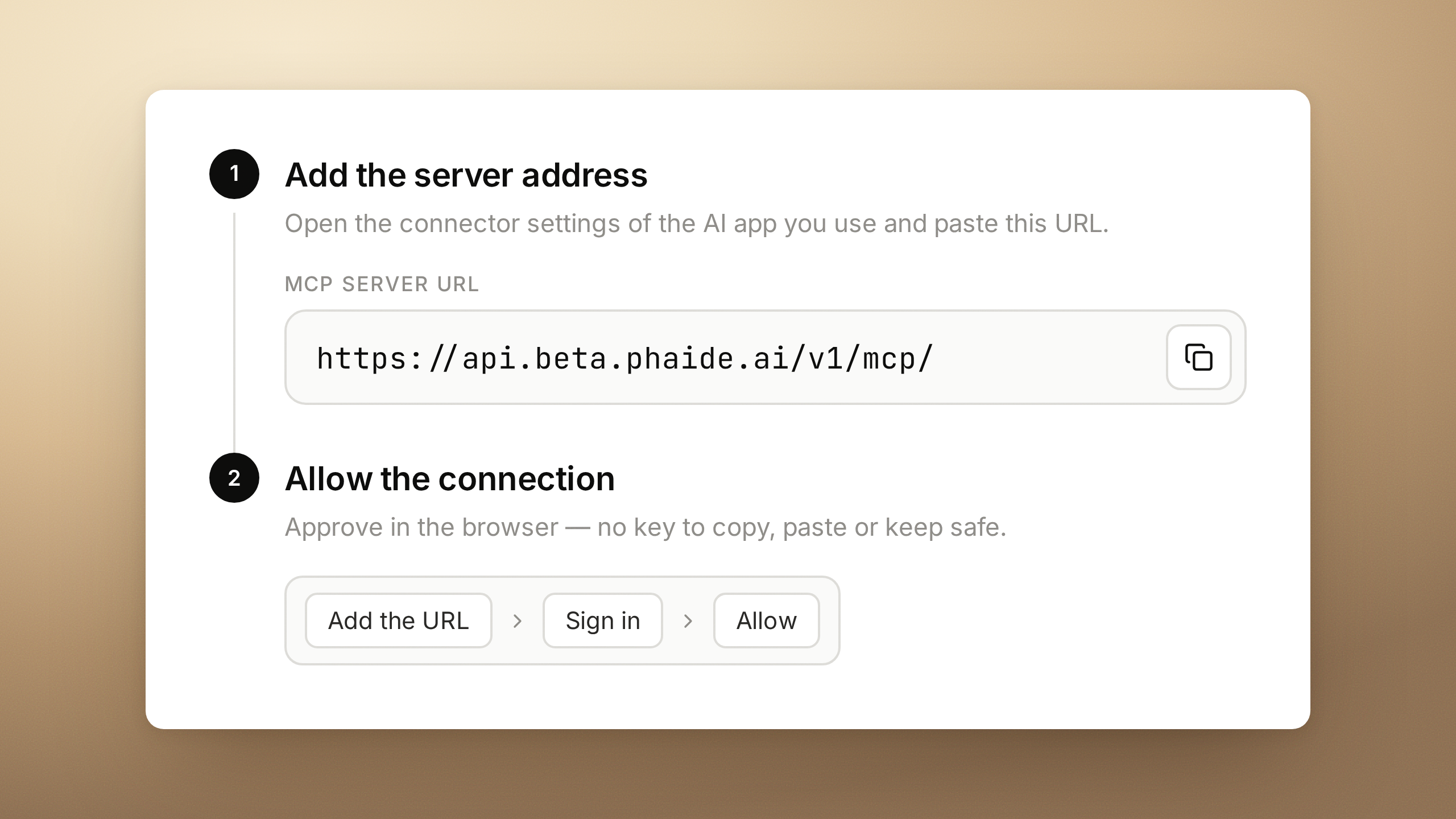
Add MCP to your agent

I want to start using phaide.ai. Here are the steps:
First, sign up at https://beta.phaide.ai/signup and complete onboarding and organization creation.
Then add the MCP server (https://api.beta.phaide.ai/v1/mcp/) and complete the OAuth authentication.
Use the phaide_get_context tool to start the setup.

Phaide is not just skills.
Empower your agent for data analysis, beyond the harness.

Compare the output

A controlled comparison — every report was generated from the same dataset with the same prompt: Which feature should we improve first to drive revenue growth? See the dataset

How it works

Quick walkthrough

What your agent gains

Beautiful shareable report

Low-cognitive-load HTML reports, generated with a share link. Constrained plot libraries and styles keep quality consistent across every harness and LLM.

Deeper analysis with fewer tokens

Same wall-clock time, deeper findings. Your agent can call a fast hypothesis-testing loop purpose-built for data analysis.

Self improving shared knowledge

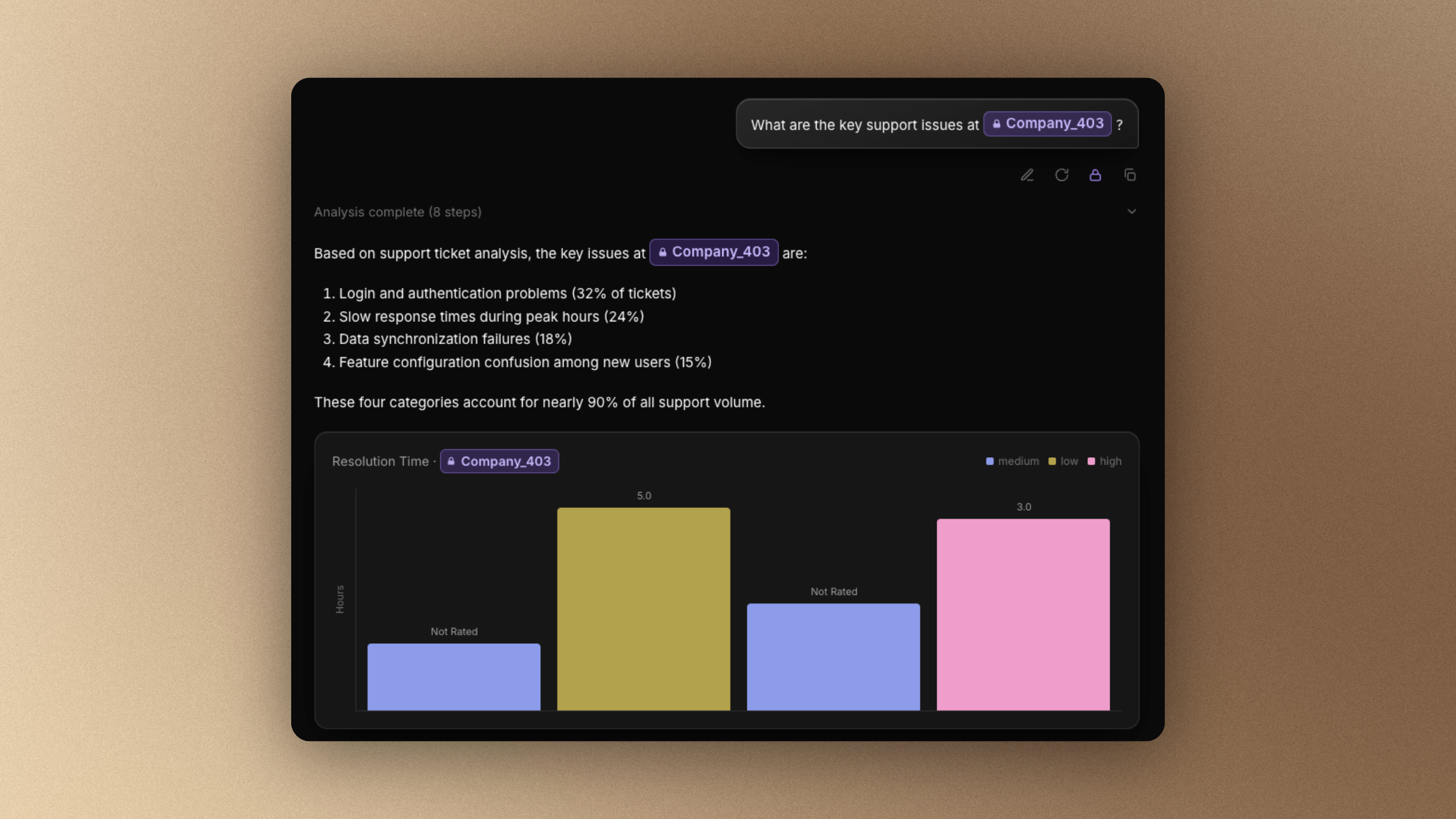
Phaide learns your semantic layer and business context from conversations, and shares it across the organization — a mistake one agent makes is never repeated by the team.

LLM-based access control

It keeps agents from going rogue. Every query against every data source is logged and monitored, and a supervising model blocks dangerous queries using the policies you set.

750+ oneclick data pipeline

Over 750 data connectors sync straight from the SaaS tools and databases you already run. No pipeline? You don’t need to build one.

Browse supported data sources

Surprising discoveries

It finds the incidents you haven’t noticed and the quiet customer complaints — overnight. Scrolling the discovery feed on a break should be fun. (Unless the news is bad.)

Database-Synced Dashboard

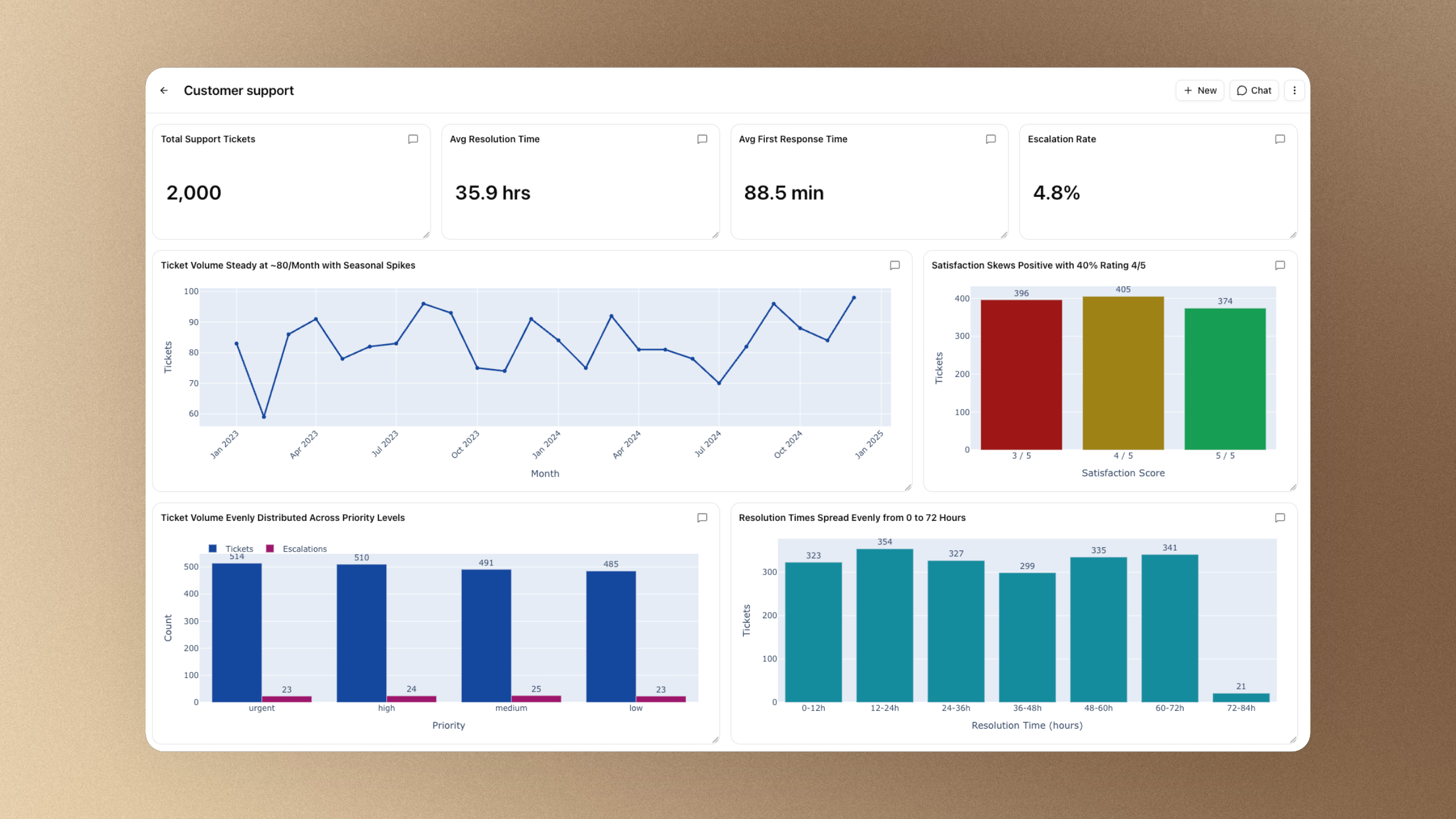
Beautiful dashboards your team can rearrange by drag and drop. Unlike a static HTML export, every value and chart updates in real time.

The craft of visualization

We believe a great data visual carries a message. To keep generated visuals both consistent and flexible, we redesigned the plotting tool itself.

Shintaro MorimotoFounder / CEO, Phaide

Simple, scalable pricing

Free
$0
No credit card required

For individuals getting started.

Features
  • 3 users per organization
  • Limited data connectors
  • CSV & Excel uploads (limited size)
  • Postgres, Supabase & MySQL connections
  • 400 monthly AI usage credits included
Get Started
Team
$99/editor/mo
+ AI usageViewers are free

For organizations at scale.

Features
  • Everything in Pro, plus:
  • Unlimited users per organization
  • Unlimited data connectors
  • 4,200 monthly AI usage credits included
  • MCP + Developer API
Get Started
Enterprise
Custom

For advanced security & scale.

Features
  • Everything in Team, plus:
  • Unlimited users per organization
  • Self-hosting
  • Custom data connectors
  • SSO
  • Dedicated support

Plans and features

Features
Free
Team
Enterprise
Users per organization
3
Unlimited
Unlimited
Data connectors
Limited
Unlimited
Unlimited
Monthly AI usage credits
400
4,200
Custom
Automatic data masking
Proactive insight detection
Multi-source analysis
Deck, sheet & report export
Business memory
Scheduled exploration
Team workspaces & sharing
MCP + Developer API
Self-hosting
Custom data connectors
SSO
Dedicated support

Phaide news & updates

View all posts

How to Use Phaide via MCP

A full setup guide for connecting Phaide to Claude — or any MCP client. Paste one URL, approve the connection in your browser, and start asking questions of your own tables from the chat you already use.

How Do You Safely Connect an AI to a Production Database? Why a Read-Only User Isn't Enough

Creating a read-only database user is not enough when you let an AI read production data. Using PostgreSQL as the example, here's how to put a Query Broker between the AI and the database — and narrow both the data it sees and the work it can run.

Phaide AI is live: AI agents that explore your data and find problems for you

From open-source quelmap and Lightning-4b to Phaide AI — autonomous data exploration, automatic masking, dashboards, and documents. Launching today on Product Hunt.

What is Agentic BI? The Next Evolution of Business Intelligence

Learn what Agentic BI is, how it differs from Tableau, Power BI, and Metabase, and where Hex, Omni, and Basedash fit in.

Why Your Data Team Is Still Asking the Wrong Questions (And How Agentic Analytics Fixes That)

Traditional BI and AI copilots only work when someone already suspects a problem. See why agentic analytics shifts data teams from reactive querying to autonomous discovery.

What Is AI-Powered Data Analysis? Benefits, Challenges, and the Services That Make It Work

A structured guide to AI-powered data analysis — from the fundamentals to real business use cases, the benefits and challenges of adoption, and the leading services.

Describe the Dashboard You Want. Phaide Builds It.

Give Phaide a name and a goal in plain language, and an AI agent writes, tests, and assembles a live, shareable dashboard from your own data.

Analyze Customer Data While Names, Emails, and IDs Stay Hidden from the AI

Phaide masks sensitive columns the moment data is imported, and catches sensitive values the instant you type them in chat — so the AI sees patterns, never the people behind them.

Still not sure? Ask an AI.

Claude, ChatGPT and Perplexity are products of their respective owners.

Give it a shot — this is something different.

Connect the MCP endpoint and ask your agent a real question about your data.

Try Free